
PRO
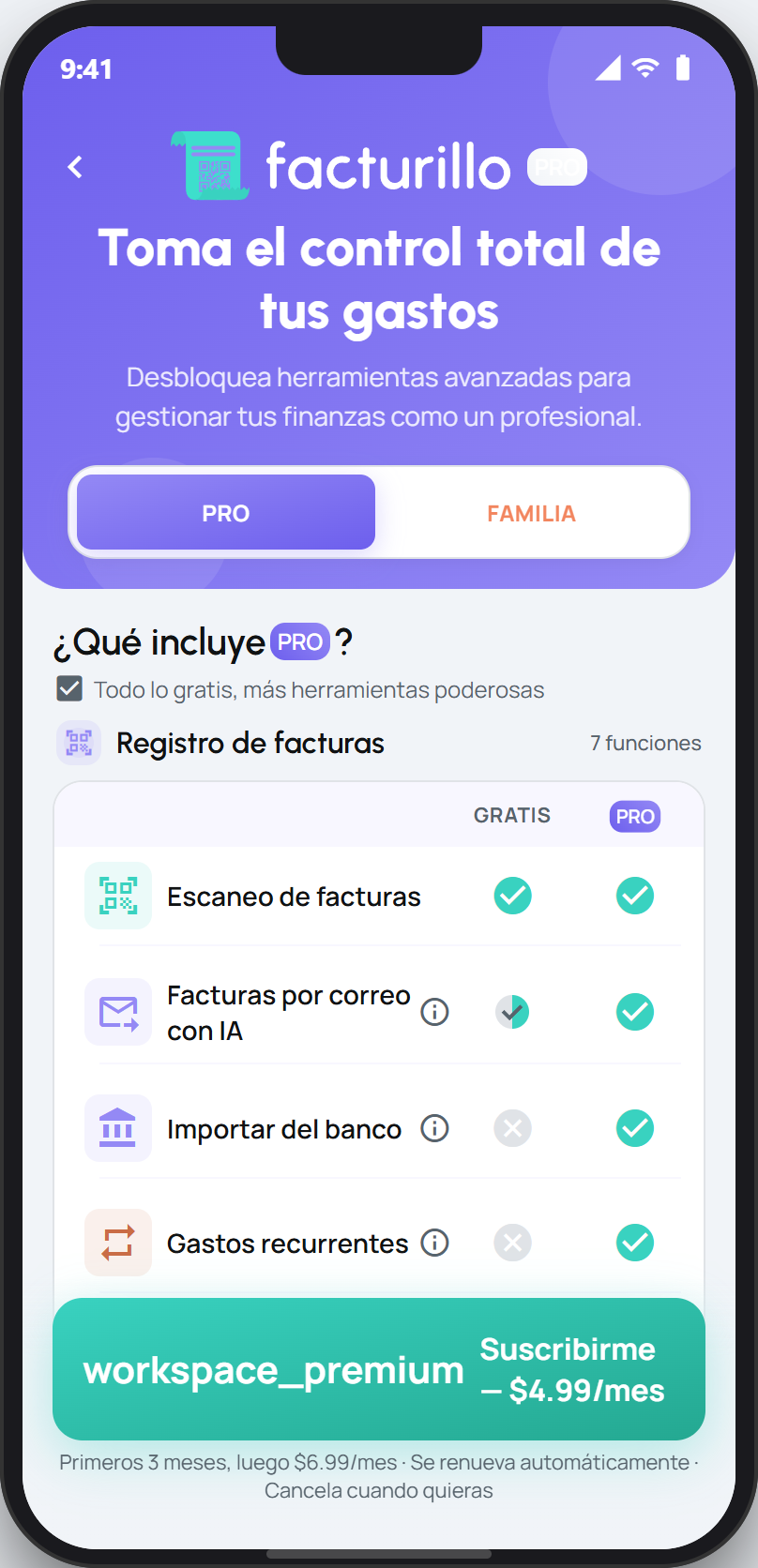
Pro unlocks facturillo's advanced features. Here is the full tour, grouped exactly like the table in the app, with a link to the guide for each feature. If what you want is which plan suits you and how billing works, that is in facturillo plans.
Before you start
- Scanning receipts and seeing your spending analysis are already in the Gratis plan. Pro does not take them away, it adds the rest.
- Shopping baskets also exist on Gratis, with a cap, and Pro lifts it. Email forwarding has two halves: forwarding electronic invoices with a QR or a CUFE is free and unlimited, and the AI reading needs a paid plan.
- Inside the app, most rows of the table can be tapped to see what that feature does before you decide.
Invoice logging
Receipt scanning. Point at the QR and the receipt adds itself. Included on Gratis too. See Scan your first receipt.
Email invoices with AI. Forward your invoices to the facturillo mailbox and they file themselves. Forwarding electronic invoices with a QR or a CUFE works on Gratis, with no limit. The AI reading of PDFs and images without a CUFE needs a paid plan. See Forward your receipts by email.
Bank import. Upload your bank statement in Excel or CSV, review its transactions and add the expenses you are missing as receipts, or link them to the receipts you already have. The app shows it in this table while it is in an experimental phase. See Import your bank statement.
Recurring expenses. You log once an expense that repeats every week, every two weeks or every month, and facturillo creates the receipt on each charge date, with a reminder beforehand if you want one. See Schedule your recurring expenses.
RUC and ITBMS on manual receipts. When you type a receipt by hand, you can record the merchant's RUC and the ITBMS. See Add a receipt with a photo or by hand.
Multi-currency support. Mark a receipt as foreign, choose the currency, and facturillo applies the exchange rate of the purchase date. See Add a receipt from abroad.
Receipt attachments. Keep photos and PDFs next to a receipt, for example a warranty or a contract, up to 10 files per receipt. See Keep files with a receipt.
Analysis and reports
Expense analysis. Your spending for the week, the month or the year, by category, by store and by brand. Included on Gratis too, and Pro adds more features inside the same screens. See Your spending analysis.
Category goals. Split your monthly budget across your store categories and see how much you have spent in each one. See Category goals.
Custom Excel with analytics. Exporting your receipts to Excel is free. With Pro you choose the sheets and the columns, use presets, add an analytics sheet with charts and export a single Pocket. See Customize your Excel.
Batch PDF download. Download in one go a .zip file with the Excel of a period, the PDF of each scanned electronic receipt and the files you attached to the receipts you added by hand. See Download your receipt PDFs in one go.
Personal vs. work expenses. Turn on your business profile, mark each receipt as Personal or Business, and view each side separately or both together. See Keep your personal and work spending apart.
Custom categories. Create your own store and product categories, each with its name, colour and icon. See Create your own categories.
Pockets and groups
Shared pockets. Invite other people into a Pocket with a link or a code, as a Member or as a Viewer, to track a shared expense. See Invite someone to a Pocket.
Expense splitting. Split each receipt of a shared Pocket between its members, see who owes whom and record the payments. See Split the expenses of a shared Pocket.
Pocket analytics and limits. Set a spending limit on a Pocket, monthly or total, with a progress bar, and see its spending by category, by store and by person. See Set a budget for a Pocket.
Shopping and savings
Shopping baskets. Build your list and facturillo compares the online stores, combining up to 2, to give you the best total price. On Gratis there is a cap on baskets and on products per basket, and Pro raises it. See Build a shopping basket.
Prices Near Me. See on a map what a product costs in the stores close to you. See See prices near you.
Special rewards. Some Puntos Facturillo rewards carry the Pro exclusive label: everyone sees them, and only people on a paid plan can redeem them. See Special rewards for Pro.
Assistant and support
AI assistant. Connect Claude or ChatGPT and ask it about your receipts and your spending, and you approve each connection from your phone. Querying your data needs a paid plan, and on Family the members can also query the family context even if their personal account is free. See Your AI assistant with facturillo.
Priority support. It is part of Pro and there is nothing to turn on. You write to facturillo's support chat on WhatsApp from the app, the same channel every plan uses. See Priority support and how to reach us.
If you share with your family
The Familia plan starts from here: it gives a full Pro account to the owner and adds a shared account for the whole group. It does not include every Pro feature, so it is worth comparing before you choose. To turn it on, create the family and invite people, see How to use facturillo Familia, step by step.
Next step
The Familia plan and its features ›